


HoneyBook vs 17hats: Which CRM Is Best for Your Biz?
Picking a CRM is one of those decisions that sounds simple until you actually start looking at your options. You open up ten tabs, fall down a rabbit hole of comparison videos, and somehow end up more confused than when you started. Sound familiar?
If you’re stuck between HoneyBook vs 17hats, you’re not alone. These two come up in the conversation constantly, especially for creative entrepreneurs and service-based business owners who need a CRM that handles client management, invoicing, contracts, and workflows without making you want to throw your laptop across the room.
So let’s break it down. I’m going to walk you through both platforms honestly, give you the real pros and cons, and help you figure out which one actually fits your business. No fake hype, just the real-deal comparison you came here for.
Quick heads up: I’m a Certified HoneyBook Pro, one of only 20 in the world. So yes, I have a favorite. But I’m not going to pretend 17hats has nothing going for it. That wouldn’t help you make a smart call.
Want help deciding which CRM is right for you, or skip ahead and get your HoneyBook account set up the right way? Book a discovery call here and let’s chat.

What Is HoneyBook? What Is 17hats?
Before we go into the HoneyBook vs 17hats showdown, here’s a quick refresher on each one.
HoneyBook is a client management and CRM platform built mostly for creative entrepreneurs and service-based business owners. Think photographers, designers, coaches, planners, consultants, and anyone who books clients and runs projects. It handles everything from lead capture and proposals to contracts, invoices, payments, scheduling, and automations. They’ve got HoneyBook AI baked in too, which is fairly new and pretty solid.
17hats is also a small business management platform, and they pitch themselves as one of the most feature-rich options out there. They cover similar ground: contracts, invoicing, online scheduling, lead capture, workflows, and they include built-in bookkeeping and SMS texting. They’ve been around for over a decade and have a loyal following.
Both are legit. Both can run your business. But they feel really different once you’re actually inside them.
Who Each Platform Is Designed For
Here’s where things start to split.
HoneyBook leans heavily into the creative and service-based world. The branding, templates, and overall vibe are built for people who care about a polished client experience. If you’re a photographer sending proposals, a coach onboarding new clients, or a designer juggling project pipelines, HoneyBook feels like it was made for you.
17hats is more of a generalist. It works for over 100 different industries and tends to attract solopreneurs who want a lot of features in one place, especially built-in bookkeeping. If you’re someone who wants to manage your books inside your CRM instead of using something separate like QuickBooks, that’s a real selling point.
Bottom line: HoneyBook is the better fit for creative entrepreneurs and businesses that prioritize client experience. 17hats works well for solopreneurs who want a feature-loaded all-in-one and don’t mind a steeper learning curve.
Ease of Use and Learning Curve
This is where HoneyBook really pulls ahead for most people on first impression.
HoneyBook’s interface is clean, modern, and approachable. It doesn’t feel intimidating the second you log in, which is honestly half the battle. The Smart Files feature lets you build proposals, contracts, brochures, and questionnaires in a single document, and the drag-and-drop editor is straightforward to navigate.
17hats has more features packed in, but the interface feels more dated and the learning curve is steeper. A lot of users say it’s powerful once you figure it out, but figuring it out takes time. And time is the one thing most business owners don’t have to spare.
Now, here’s where I have to be real with you. A clean interface doesn’t mean a foolproof setup. I’ve audited hundreds of HoneyBook accounts where the owner thought everything was running smoothly, only to find broken automations, disconnected Smart Files, and pipelines that don’t actually match how their business runs. Looking simple on the surface and being strategically built underneath are two very different things.
Workflows, Automations, and Setup Differences
Both platforms have automations, but they work differently.
HoneyBook automations are visual and trigger based on actions like a client signing a contract, paying an invoice, or filling out a form. You can build full client journeys that send emails, create tasks, and move projects through your pipeline without you lifting a finger.
17hats workflows are arguably more powerful in terms of how many triggers and actions you can chain together. They give you serious automation control. The tradeoff? Building those workflows takes more time and more technical know-how.
Here’s the truth though. Whether you go with HoneyBook or 17hats, the platform is only as good as the setup behind it. A fully loaded CRM that’s set up wrong is just an expensive mess.
That’s why so many business owners hire a HoneyBook expert to handle the setup for them. It saves weeks of trial and error, and it means your automations actually work the way they should from day one.
If you want your HoneyBook account fully set up by a HoneyBook Pro, check out my Full Setup service here. I handle the systems, Smart Files, automations, and branded client portal so you don’t have to.
Client Experience: Portals, Proposals, and Communication
This is one of HoneyBook’s biggest strengths.
The branded client portal in HoneyBook gives your clients one place to view their files, sign contracts, pay invoices, and message you. It looks professional, it’s easy for clients to use, and it makes you look like you’ve got your stuff together.
17hats also has a client portal, and it works fine. But the design is more basic and doesn’t feel quite as polished. For service-based businesses where the client experience is part of how you sell, that polish actually matters.
When it comes to proposals, HoneyBook’s Smart Files are flexible and beautiful. You can build interactive documents that include service selections, pricing options, and signature blocks all in one place. 17hats has its quote, contract, and invoice combo document, which is functional, but less customizable on the design side.

Customization vs Simplicity
Here’s the tradeoff in plain terms:
- HoneyBook prioritizes a clean interface and a polished client experience. The platform is more approachable, but a system that actually converts leads and runs your business still requires real strategy underneath.
- 17hats prioritizes feature depth and customization. It gives you more knobs to turn but expects you to be willing to learn how to turn them.
Neither approach is wrong. It just depends on what matters more to you. If you want a CRM that looks polished to your clients and runs your business behind the scenes, HoneyBook is the better pick, especially when it’s set up by someone who knows what they’re doing (hi!).
Pricing and Long-Term Cost Comparison
Now let’s talk money, because HoneyBook pricing vs 17hats pricing is a question I get all the time.
Side-by-Side Subscription Cost
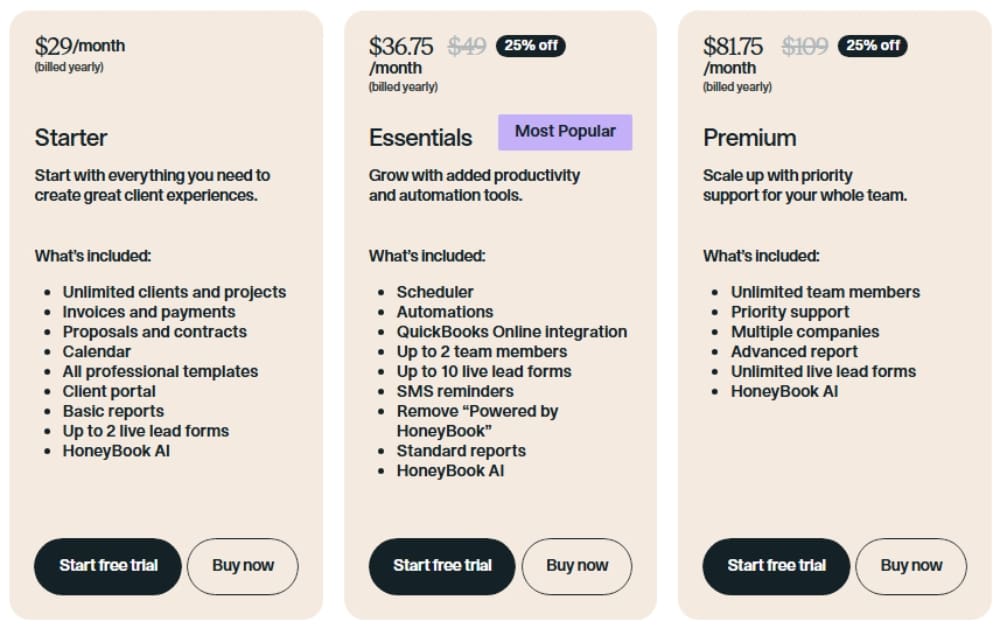
HoneyBook has three tiers (regular pricing):
- Starter: $36/month monthly, or $29/month billed yearly
- Essentials: $59/month monthly, or $49/month billed yearly
- Premium: $129/month monthly, or $109/month billed yearly
You can start with a free trial and no credit card is required.
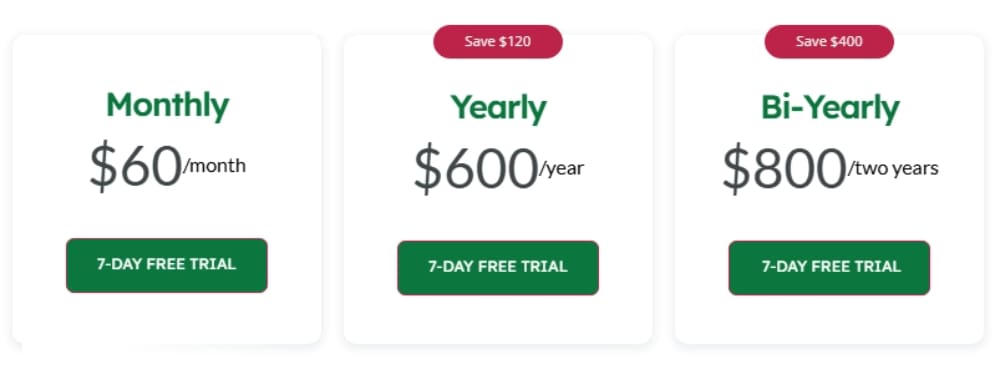
17hats has one all-inclusive plan with three payment options:
- Monthly: $60/month
- Yearly: $600/year (averages $50/month)
- Bi-Yearly: $800/two years (averages about $33/month)
They offer a 7-day free trial and a 30-day money-back guarantee.
The Hidden Cost of Time and DIY Setup
Here’s what most comparison posts skip: the real cost isn’t the monthly fee. It’s the hours you spend setting it up yourself.
If you spend 40 hours building out workflows, customizing files, and figuring out automations, what’s that worth to you? For most business owners, it’s worth way more than the subscription itself. And that’s not even counting the leads and revenue you lose while your CRM is half-built.
This is why hiring a HoneyBook Pro pays for itself fast. You skip the learning curve, you get a system that actually works, and you start making money from your CRM right away instead of wrestling with it for months.
Want a quick fix instead of a full setup? Book a HoneyBook Intensive and we’ll knock out your biggest CRM headaches in a 2-hour session.
HoneyBook vs 17hats: The Honest Verdict
Here’s the quick recap:
- Choose HoneyBook if you want a clean, easy-to-use CRM with a beautiful client experience, built specifically for creative entrepreneurs and service-based businesses.
- Choose 17hats if you want a lot of features under one roof, including built-in bookkeeping, and you don’t mind a steeper learning curve.
For most of the business owners I work with, HoneyBook is the clear winner. It’s easier to set up, easier for your clients to use, and it scales with you as your business grows.
Why Setup and Strategy Matter More Than the Platform
I’ll leave you with this. The CRM you pick matters less than how you set it up.
I’ve seen people on HoneyBook with messy workflows, half-built automations, and Smart Files that don’t convert. The platform itself isn’t the problem. The setup is. And without a strategy behind it, even the best CRM on the market will leave money on the table.
Your CRM is a tool. Your strategy is what makes it work.
That’s why I focus on building HoneyBook accounts that match how you actually run your business, not how some template says you should. Because at the end of the day, you didn’t start your business to manage software. You started it to do work you love and get paid well for it.

Final Thoughts
If you’re still on the fence about HoneyBook vs 17hats, take the free trials and play around. See which one feels right. But if you’re already leaning HoneyBook and want to skip the trial-and-error setup phase, you know where to find me.
Now that you know how HoneyBook stacks up against 17hats, curious how it compares to Dubsado? I broke that one down too right here.
Ready to get your HoneyBook account set up the right way? Here’s how I can help:
→ Book a Full Setup if you want me to handle everything for you
→ Book a HoneyBook Intensive if you want to fix your account in a 2-hour working session
→ Book in for Consulting with a Strategy Call or Audit if you want expert eyes on your account before making changes
→ Reach out here if you’re not sure which option is right for you
You can also follow along on Instagram for more HoneyBook tips and behind-the-scenes content.
Your CRM should be working for you, not the other way around. Let’s make that happen.
Ready to try HoneyBook?
If this post convinced you to give it a shot, use my link to start a free trial and get 30% off your first year. No pressure, but it’s a pretty great deal if you’re already considering it!

After working inside 250+ HoneyBook accounts, I’ve seen every version of half-baked automation and piece-mealed templates imaginable.
I don’t get overwhelmed… I get to work.
When I’m off-duty, I practice what I preach. I enjoy my weekends laptop-free, my brunch unbothered, and my nights free from ‘just one more email.
Around here, I help business owners close the gap between what they look like and what they operate like.
I cannot stand when a brand markets itself as a luxury experience and then delivers onboarding that feels like opening a bag of chips and discovering it’s 80% air. If you’re going to look premium, you should operate premium (and I’m the one that can help you with that).
I want to talk about the parts of your business no one else talks about.
I’m Karly — The Systems Strategist Behind High-End Client Experiences
I’ll help you figure out what needs to be done and tackle it with you live, so you can move forward instead of wasting time trying to build systems that still don’t work.
We’ll focus on what matters most so you can skip the endless tutorials and guesswork and leave with a system that feels easier and more organized. You’ll walk away with real progress already made in your account.
If you want help improving things in HoneyBook, this is a focused two-hour session where we work through it together so you can move forward faster.
HoneyBook Intensive

I’ll design and build a custom HoneyBook setup for your business so every step feels effortless for both you and your clients — and finally runs the way you’ve always wanted it to.
From inquiry to offboarding, your client experience will reflect the same quality and care you put into your work. You’ll have a consistent process for all your clients that leads to fewer follow-ups, faster bookings, and more referrals.
Whether you’re brand new to HoneyBook or have used it for years, this is for you if you don’t have the time, patience, or desire to figure it out yourself.
HoneyBook Full Setup


